

Security testing in software testing is not just an option; it’s a necessity in today’s evolving digital landscape. Cyber threats are becoming increasingly complex, making it critical for enterprises to implement robust security measures throughout the Software Development Lifecycle (SDLC).
It is essential to follow proactive practices to tackle security threats and achieve effective software security. This involves integrating security considerations from the initial design phase through deployment and maintenance. Software security includes methodologies incorporated in software testing to ensure reduced data breaches and enhanced protection from potential cyber threats. Following best practices in software security testing and development helps mitigate risks, protect sensitive data, and maintain user and stakeholder trust.
CrowdStrike’s 2024 Global Threat Report emphasizes the increasing speed and stealth of cyberattacks. Do you feel that your software is more exposed? Let’s tighten up that code and keep your programs secure with these best practices!
Organizations must be vigilant when it comes to cybersecurity. Implementing software security practices and strategies is key. This blog explores ways to protect software, discusses the best practices in security testing, and highlights innovative approaches to enhance digital security.
Importance of Security Testing in Software Testing
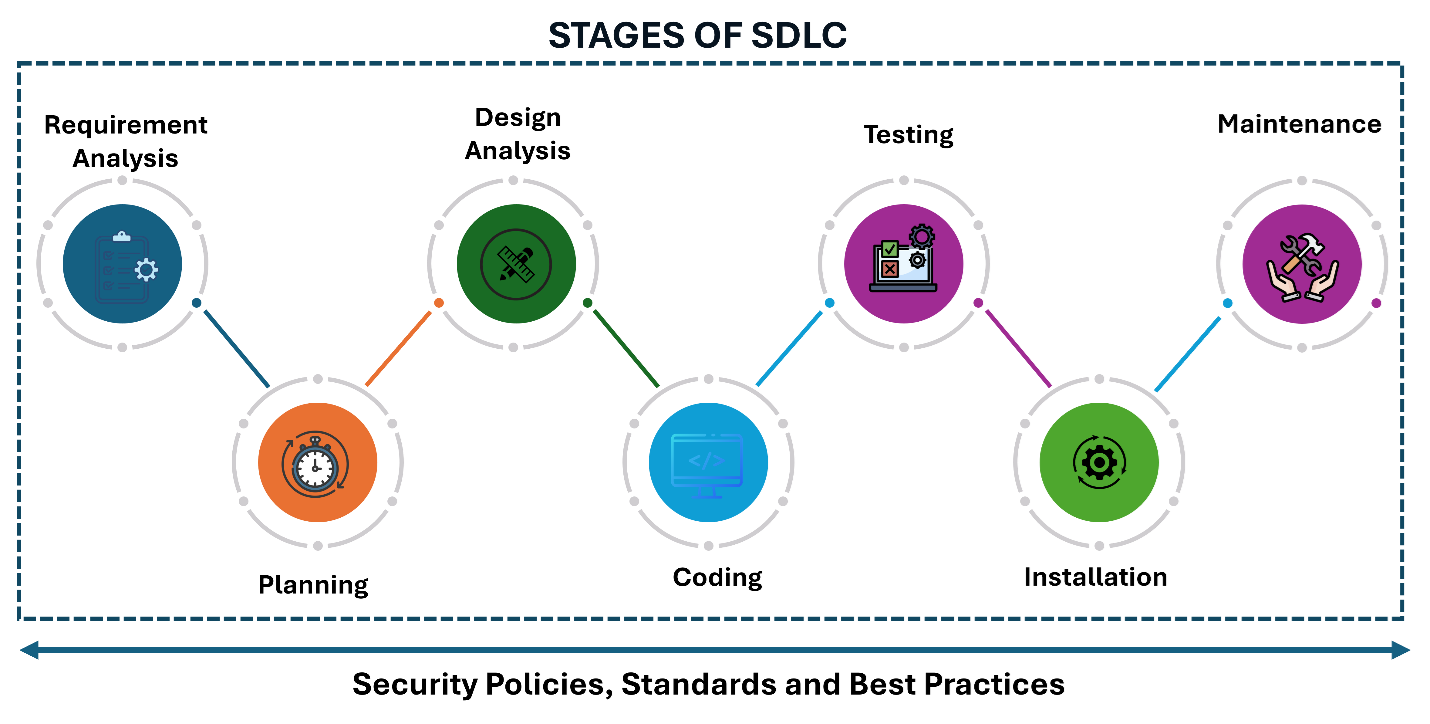
Security has become a mandatory component of software development, not an afterthought. To improve effectiveness, security testing should be integrated across all stages of the SDLC—from requirements gathering to design, development, testing, deployment, and maintenance. Early detection and mitigation of vulnerabilities prevent costly issues later.
The global average cost of a data breach increased 10% over the previous year, reaching $4.88 million in 2024 (up from $4.45 million in 2023) — the biggest jump since the pandemic, according to the Annual Cost of a Data Breach Report.
Implementing security measures and tools at every stage of development is critical to protecting identities and sensitive user data. This ensures organizational stability and credibility.
15 Best Practices in Security Testing for Software Development
Additionally, a study by the National Cybersecurity Alliance reveals that 60% of small companies go out of business within six months of a cyberattack.
Here are 15 essential best practices for software security testing:
1. Use Multiple Testing Techniques
Using diverse testing techniques provides broader coverage of potential vulnerabilities. Each approach uncovers different types of risks.
- Black-box testing: Evaluate the application without internal knowledge.
- White-box testing: Examine the source code for logic flaws.
- Gray-box testing: Combine both methods for balanced coverage.
| Testing Type | Knowledge of Internals | Access to Source Code | Approach |
|---|---|---|---|
| Black-box | None | No | Focus on inputs and outputs |
| White-box | Full | Yes | Internal code structure and logic analysis |
| Gray-box | Partial | Limited | Combines external and partial internal testing |
Benefits:
- Identifies a wider range of vulnerabilities
- Simulates multiple attack scenarios
- Reduces time and cost of production
2. Conduct Regular Security Testing
Regular audits ensure emerging threats are detected early. Conduct automated scans, manual audits, and continuous assessments across all stages of development.
- Integrate automated security scans into CI/CD pipelines
- Perform periodic manual audits
- Monitor production systems for anomalies
3. Integrate Security Testing into the Development Process
Embed security testing directly into development workflows for early detection and faster fixes.
- Automate tests as part of code commits
- Integrate security checks in CI/CD pipelines
- Provide real-time feedback on vulnerabilities
4. Threat Modeling
Identify and prioritize threats proactively by simulating attacker behavior. Tools include Microsoft Threat Modeling Tool, OWASP Threat Dragon, and IriusRisk.
- Planning: Define scope and goals
- Identification: List potential threats
- Mitigation: Develop countermeasures
- Remediation: Apply and validate fixes
Enhance your threat modeling with Calsoft’s DevSecOps services.
5. Code Reviews and Static Analysis
Early code reviews catch vulnerabilities before production. Research shows up to 90% of security issues stem from coding flaws.
- Detect issues before deployment
- Improve code quality and maintainability
- Promote a culture of secure coding
6. Dynamic Application Security Testing (DAST)
DAST simulates real attacks on live applications to detect runtime vulnerabilities such as XSS and SQL injection.
- Identify issues missed by static analysis
- Test authentication and session management
- Validate runtime security behavior
7. Penetration Testing
Penetration testing simulates cyberattacks to uncover exploitable vulnerabilities missed by automated tools.
- External testing: Assess internet-facing assets
- Internal testing: Evaluate internal networks
- Blind testing: Minimal information, simulating real attacks
8. Test Third-Party Components
- Audit external dependencies
- Monitor for known vulnerabilities
- Update libraries regularly using tools like OWASP Dependency-Check
9. Perform Regular Updates and Patching
- Implement robust patch management
- Prioritize critical updates
- Test patches before production rollout
10. Document and Communicate Findings
- Maintain detailed reports of vulnerabilities
- Provide remediation steps
- Share results with development and management teams
11. Security Testing for APIs
- Implement authentication and authorization controls
- Validate inputs and encode outputs
- Prevent injection attacks and XSS
12. Automate Security Testing
- Integrate automated testing into CI/CD workflows
- Run vulnerability scans during builds
- Use pre-commit hooks to prevent insecure code
13. Integrate Multiple Tools
- Use static analysis tools for code review
- Use dynamic tools for runtime testing
- Employ vulnerability scanners for continuous monitoring
14. Ensure Secure Data Storage and Transmission
- Use strong encryption for data in transit and at rest
- Use HTTPS and secure protocols
- Ensure compliance with GDPR, CCPA, and similar laws
Calsoft’s cloud backup offerings provide enterprise-grade encryption, ensuring secure and flexible data access anytime, anywhere.
15. Continuous Monitoring and Improvement
- Implement real-time security monitoring systems
- Conduct periodic audits and penetration tests
- Update security measures to address new threats
Benefits of Deploying Best Practices
- Enhanced Security Posture: Identify vulnerabilities early and reduce risks.
- Cost Savings: Fix security issues early to avoid expensive breaches.
- Regulatory Compliance: Stay compliant with GDPR, CCPA, and similar frameworks.
- Improved Product Quality: Deliver secure, stable software.
- Faster Time-to-Market: Streamlined development and fewer reworks.
- Customer Confidence: Build trust through secure development practices.
Wrapping Up
Software protection is an ongoing commitment that demands strategy, awareness, and expertise. By adopting these best practices, organizations can strengthen their security posture and protect valuable digital assets.
Looking for a trusted partner that adheres to the best security testing standards? Calsoft offers 25+ years of experience in digital transformation and product engineering. Don’t leave your business vulnerable—partner with us for robust, enterprise-grade software security.